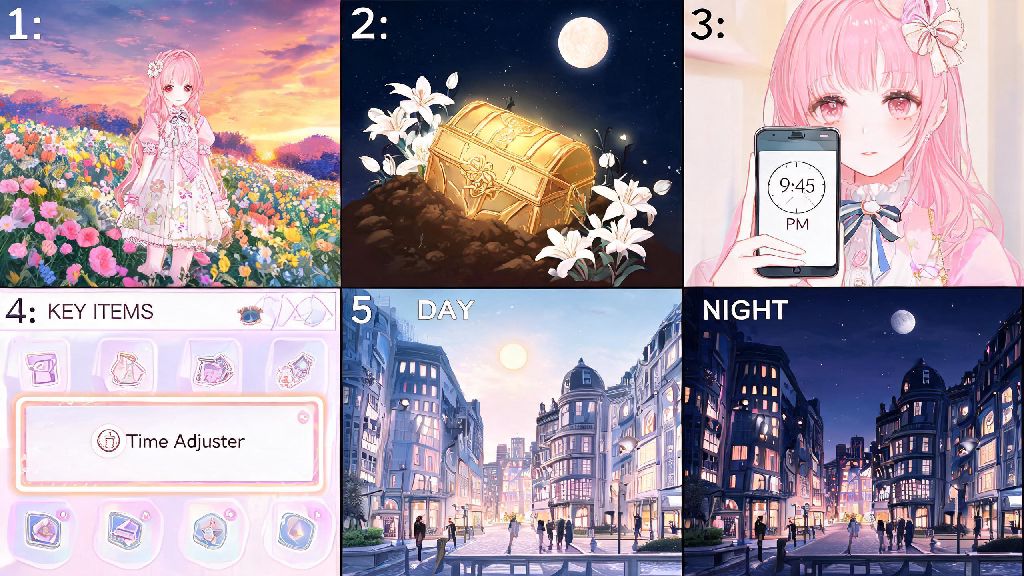
If you’ve spent any amount of time wandering the colorful open world of Infinity Nikki, you’ve probably run into at least one time-gated roadblock. Maybe you found a glowing chest that only unlocks at night, or an NPC that refuses to give you a rare crafting recipe until the sun rises. I spent almost 25 minutes loitering near a flower field last week waiting for sunset to spawn the lunar lilies I needed for a limited dress, before I finally figured out how to change the time in Infinity Nikki and skip the wait entirely. A lot of new players miss this feature entirely because it’s not unlocked as part of the initial tutorial, and it’s tucked away in your key items menu instead of the main settings. This guide will walk you through everything you need to know to unlock, use, and get the most out of the time adjustment feature.
Prerequisites to Unlock Time Changing in Infinity Nikki
You can’t adjust the in-game time right when you start playing, and that’s intentional. The feature is locked behind a short side quest that becomes available once you hit a few basic progress milestones. You won’t have to grind for dozens of hours to unlock it, though, most players can get access within their first 3 hours of gameplay if they follow the main story. First, you need to complete the first three main story chapters, which take you through Windmill Town and the surrounding meadow areas. You’ll also need to reach player level 8, which happens naturally as you complete quests and collect styling XP from outfit challenges. Once you hit those two marks, you’ll get a pop-up notification for a side quest called “Wishes of the Clock Tower” from an NPC named Lila standing near the large clock tower in the center of Windmill Town. The quest only takes about 10 minutes to finish. You just have to collect three broken clock parts from the meadows just outside of town, turn them in to Lila, and she’ll give you the Pocket Clock Watch key item that unlocks the time adjustment feature. I skipped this quest for two days when I first started playing because I was rushing through main story content, and I wasted so much time waiting for specific times of day. Don’t make that same mistake.
Step-by-Step: How to Change the Time in Infinity Nikki
Once you have the Pocket Clock Watch in your inventory, adjusting the time only takes a few seconds, no matter where you are in the open world. You don’t have to spend any in-game currency, stamina, or items to use it, and you can use it as many times as you want as long as you’re not in an active cutscene or instanced dungeon. First, open your in-game backpack from the small backpack icon in the bottom right corner of your screen. Navigate to the “Key Items” tab, which is the third tab from the left in the backpack menu. You’ll see the Pocket Clock Watch listed there, along with any other quest items you’ve collected during your playthrough. Second, select the Pocket Clock Watch and click the “Use” button that pops up below the item description. A circular 24-hour time wheel will appear in the center of your screen, with small markers for each hour, plus four preset buttons for dawn, noon, dusk, and night for quick access. Third, drag the slider on the time wheel to the exact hour you want, or tap one of the preset buttons if you don’t need a specific time. You’ll see a small preview of what the lighting will look like at your selected time in the top right corner of the time wheel menu. Fourth, click the “Confirm” button at the bottom of the menu. The screen will fade to black for one to two seconds, and when it loads back in, the world will be set to your chosen time. If you follow these steps exactly, you won’t run into any issues when you want to change the time in Infinity Nikki, no matter which area of the map you’re exploring.
Top Reasons to Adjust Your In-Game Time Regularly
This feature isn’t just a fun novelty for taking pretty photos. It’s a core quality of life tool that can cut down on grind, help you unlock rare content, and make your playthrough way more enjoyable. I use it at least three or four times every time I log into the game, and it’s saved me hours of waiting around for specific in-game conditions. Some of the best uses for the time adjustment feature include:
Common Mistakes to Avoid When Changing Time in Infinity Nikki
While the time adjustment feature is mostly forgiving, there are a few small quirks that can trip up new players if they don’t know what to look out for. I’ve made almost all of these mistakes myself, so I can tell you exactly what to avoid to save yourself frustration. First, don’t change time during active event challenges. If you’re in the middle of a timed event like the Fashion Run, Puzzle Collection, or any limited time story event, adjusting the time will automatically reset your progress for that challenge, and you’ll have to start over from the beginning. I learned this the hard way when I tried to skip to dusk mid-Fashion Run to get a better photo of my outfit, and lost my 3-star rating for the entire challenge. Second, don’t adjust time repeatedly in a 5-minute window. The game has a soft cooldown for the feature to prevent players from abusing it to farm daily rewards over and over. If you use the time adjustment feature more than three times in five minutes, it will lock you out for 10 minutes. It’s not a huge penalty, but it’s really annoying if you’re in a hurry to farm a specific set of materials. Third, remember that daily resets happen at 5AM server time, no matter your custom time setting. A lot of new players think they can skip to 5AM to get their daily login rewards, weekly challenge resets, or event bonuses early, but the game uses universal server time for all of these features. Adjusting your local in-game time won’t affect reset times at all, so don’t waste your time trying to game the system. Also, if you’re playing co-op with friends, changing your time won’t affect their game world at all, only yours. You don’t have to worry about messing up their progress if you adjust your time while you’re exploring together.
At the end of the day, knowing how to change the time in Infinity Nikki is one of those small quality of life features that makes the entire game feel way less grindy and way more fun. You don’t have to sit around waiting for the right hour to get the loot, quests, or photos you want, and it only takes a few seconds to use once you unlock the pocket watch. If you haven’t unlocked the feature yet, go run that Clock Tower side quest the next time you log in, you won’t regret it. If you have any other tricks for using the time adjustment feature, drop them in the comments below, I’d love to test them out myself.